Using voice for a floating to-do workflow
“Floating notes” aren’t anything new - they grew popular along with the “Zettelkasten - Graph View - Wikilinks” notes era, yet, like most people, it didn’t stick with me, but the idea of floating notes did. Floating notes are pretty cool if you think about it - capture any thought, anywhere and at any time, or rather, that’s my definition of it. So, now comes the app - how do we achieve this omnipresence of a note? Well, I too got sucked into the note-taking rabbit hole, and stumbled upon Obsidian, and that is what I’ve stuck with till now for several reasons:
- It’s simple, and you can configure it to be very minimal and barebones to reduce distractions.
- It just works - the markdown, the cross-platform apps, nothing fancy.
- It’s extensible - even though I have 2 plugins, if I ever want to have 100, it won’t be a problem.
- Built-in sync is paid, but using a workaround is rather simple.
Now, using Obsidian for notes might make sense, but how does using it for floating notes make any sense at all? I mean, sure, it has a mobile app, but typing my thoughts onto my phone is way too much friction for someone as lazy as me. So what’s less friction? How about sending voice notes to a friend? That’s fast, right? So why not do the same for floating notes?
Voice -> Floating notes
Even though the idea might sound complicated, it’s actually simple. At least with the current state of tools and technology its pretty simple, as people have done most of the heavy lifting for us. Personally, I use a Mac and Android for my notes, so I’ll be sharing my workflow with those two but I assume it can easily be replicated across other systems such as Windows, Linux, or iOS.
For my Mac, I found a cool little voice transcribing app called Superwhisper. What separates it from other generic transcribers is that it lets me put in a custom prompt that it passes onto an LLM, along with the transcribed text, and the response from the LLM is copied to my clipboard instead of just the transcribed text. This allows me to hack my way around it to perform some pretty cool things, like telling it what I want my new feature to be, and it converts that into a fully featured and detailed prompt for Cursor or Claude Code.
Ok, but how does this play into floating notes? Well, since the resultant text is copied into my clipboard, I can build a simple clipboard monitoring script that checks for new text from the app and then simply updates the floating.md file in my Obsidian vault. This vault is also synced to my phone via a GitHub repository using the Obsidian Git plugin and MGit on my phone. But a problem still remains - how do we understand which text is copied by me and which text is from Superwhisper? That’s where the LLM comes in. My prompt to the LLM is that it appends “%FOR OBSIDIANMD%” after the transcribed text, and as you can probably guess already, I only process those clipboard items that end with that text marker.
The script
I could’ve made a full-blown customizable app using Claude and Swift and had even started with one, but I realized what I actually needed was something low profile and simple, so I went with a bash script instead, with around ~130 lines of completely vibe-coded code instead.
The phone part
Cool, so the Mac end is all sorted, but what about the phone end? Let’s send some voice notes to people, but how?
A Telegram(or WhatsApp or iMessage) bot. And of course, it’s also a single file and vibe-coded. I think you can see that I like simple things.
This is the simplest approach I could think of - a telegram bot that listens for voice notes, transcribes them, and pushes the updates to GitHub to my repository, syncing the change to all my devices. Ok, but how do we transcribe the audio the bot gets? For that, there’s a lovely Python library called faster_whisper, which, like its name, is really fast as well as really good at transcribing, and it’s also free(if you self-host it like me).
The friend
The bot, as I mentioned, is a single Python file that is Dockerized so that I can easily self-host it on my home server. As it promises, it’s fast, and personally, my home server is a spare laptop, and it runs fine with an average CPU load of ~3% even when transcribing. Although I use the base models because I don’t have a GPU, it runs pretty well considering the limitations, so if you’re hosting it on a VPS or something like that, you can probably use a better and bigger model for even better transcriptions and speeds.
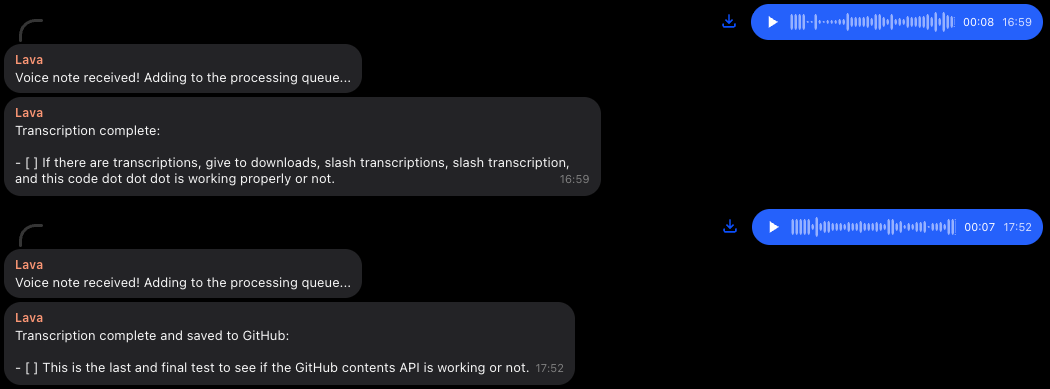 That first transcription is not incorrect, I just sent it random stuff I saw on my screen
Personal workflow
Even though I’ve been talking about floating notes in this article a lot, I don’t actually use this system for taking “notes” in the conventional way you might be thinking of. My prompt is a bit more than just appending “%FOR OBSIDIANMD%” and in fact, my floating notes obsidian page is just a huge list of to-do items. For everything I say, the LLM processes it to also prepend “- [ ]” and rephrases my transcription to be more like a to-do instead of exactly what I spoke, completely raw. I find this very useful as I can create to-do items as and when I am told or when something comes to mind. My complete prompt for the “Notes” mode is:
Prefix the user’s message with “- [ ]”. Fix any grammatical mistakes. Rephrase the user’s message to be a proper TO-DO item. If the user’s task is too big you can split it into multiple TO-DOs just make sure to start each TO-DO on a new line and prefix it with “- [ ]”. Append “%FOR OBSIDIANMD%” at the end of the user’s message.Something you might think of in this situation is how do I mark things as done? Well, you’re right I don’t or can’t just say “mark todo X as done” but it does not mean that you can’t do that - with a little bit of prompt engineering and a better script and telegram bot I don’t see why you can’t but rather the reason I don’t do it is because I think having friction between marking a task as done means that I’ll sit down and mark it as done manually when I’m actually done with it instead of just sending a voice note while mid task and then forgetting about it even though I might not’ve completed it - that’s completely personal preferrence though.
Bringing it all together
Superwhisper, the script, and the telegram bot all come together to form the perfect floating notes cum to-do list, which syncs across all my devices and is exactly what I was looking for, so I’ve no complaints, but I think that my setup is simple enough to be molded into any workflow or device without much complexity. I like to believe that this is a template and not a system; however, it might still not exactly be what you’re looking for, and that’s fine too - just build one for yourself exactly as you like it.
With that, this chapter comes to an end. If I ever make enough changes that completely change my perspective on how I use this workflow, I’ll probably write about it again here; otherwise, expect something new.